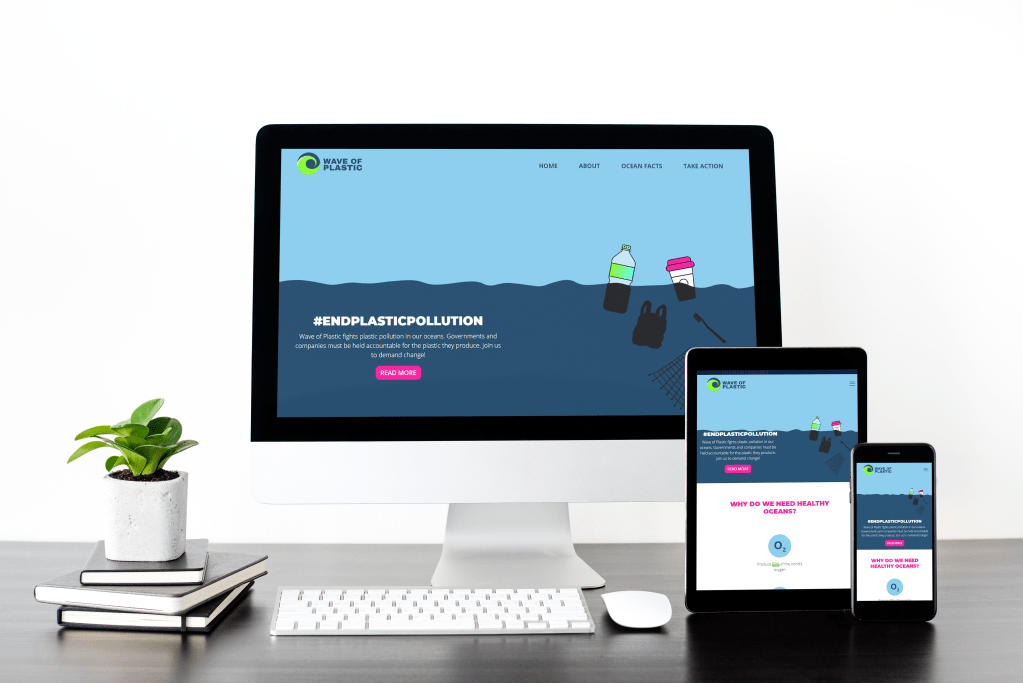
For this course assignment, I had to create an interactive website for a fictive non-profit organisation that raises awareness around plastic pollution and its impact on Marine Life.
All the information on the website should have an infographic style, the homepage being the most important part. I should create my own graphics and text to avoid copyrighting infringement. The website must adapt to all screen sizes.
Plastic Wave is a non-profit organisation that aims to raise awareness about plastic pollution and its impact on marine life. Their main goal is to inform the public about the problem and its causes and give them options to take responsibility and demand change from companies, governments and institutions.
For this week’s assignment we had to build a mobile-friendly website from scratch using WordPress and customising a theme to fit the client’s needs. Since the web I created last week was already mobile-friendly, I was advised by my tutor to use the same for this assignment. Here is a link to last week’s post.
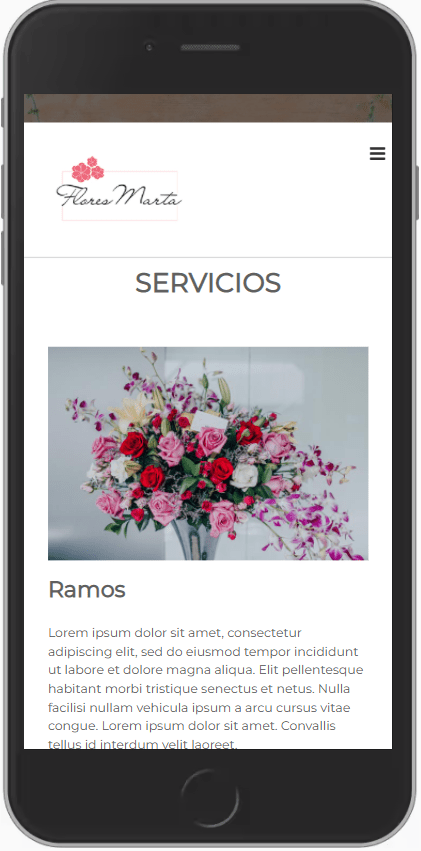
Below I have attached screenshots of the desktop and mobile version of the website.
It’s important for me to see that you can follow through on the entire process – from the brief to the completed website.
Please explain why you make certain decisions. How do these decisions fit in with the business strategy?Upload your brief, wireframe, sketches and link to your website to your WordPress blog. There’s quite a lot to do for this assignment, so it’s advisable to keep your website simple.
I decided to continue with the same client as last week.
BRIEF
Flores Marta is a small local florist’s located in Valladolid, Spain. We offer flower arrangements for events, interior decoration, funeral flowers and gifts. We receive part of our flowers and plants directly from Holland, one of the world’s biggest producers. Besides, we have our own nursery in the town’s outskirts, where we grow the rest of our products. This way, we guarantee the freshness of our plants and flowers, so they last longer.
Business Strategy
Mission Statement Normalise flowers and plants’ use in day-to-day life by offering fresh, durable and affordable arrangements and solutions.
Objectives 1 – Sell flowers and plants 2 – Offer a wide variety of floral arrangements 3 – Grow a trust relationship with the community
Value Proposition 1 – Fresh and long-lasting products 2 – Personalised arrangements 3 – Support local commerce and community
Elevator Pitch Flores Marta guarantees fresher, longer-lasting cut flowers in your home or event.
How the website would fit into your business strategy I want my website to showcase the work we do, showing photos of the bouquets and arrangements we prepare. Initially, we will not sell online because we prefer to create a relationship with the clients first and offer them personalised assistance. We want to use the web as a catalogue for our customers, where they can also find the contact details and address for them to contact or visit us. In the future, when the community has grown, we would like to introduce online shopping. The web should clearly state the origin of our products and our involvement in the local community. I want the website to reflect our brand with a fresh, clean design. It must be easy to navigate.
Web Architecture
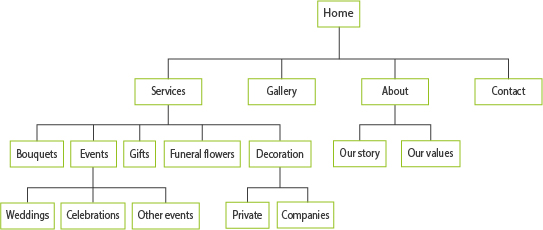
The website is a one-page with anchor points to the different sections.
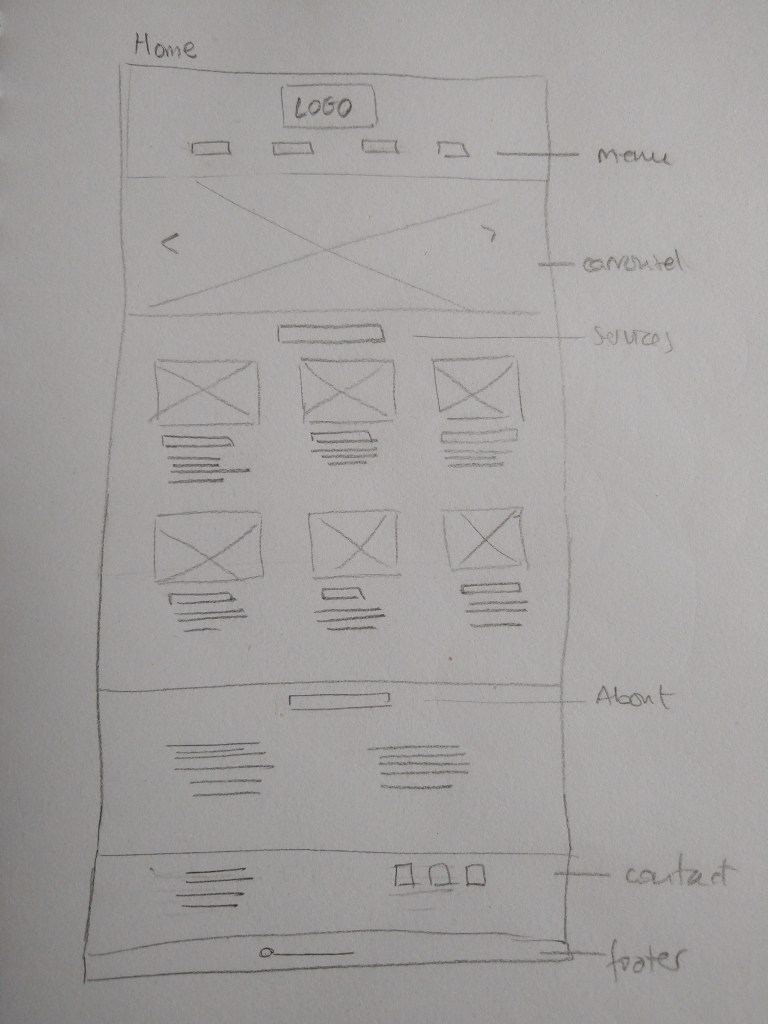
WIREFRAME
I chose to use a low-tech wireframe because it is a small website, the client has a limited budget and it allows me to make changes easily.
WEB STRATEGY
Domain and hosting The domain name suggested to my client is the business’ name, which is relevant, memorable and usable. For the suffix, we chose .com since it is available. We also decided to purchase .es, the specific suffix in Spain, and redirect it to http://www.floresmarta.com. For hosting, I recommended BlueHost, as it is currently ranked as one of the best services for small businesses, ideal for WooCommerce and very popular for WordPress sites.
Since this is a fictitious client, I didn’t purchase the domain mentioned above or host with BlueHost. Instead, I created a subdomain in the domain I have for this course with one.com.
Design The website design will be clean and fresh, intuitive and user-friendly with a focus on visual content. It will display correctly in all browsers and be responsive on mobile. A picture carousel in the website header will show the florists’ most relevant work. The web will only be updated occasionally on special dates. The business’ Instagram feed will be displayed on the site to show pictures of the latest orders and work.
The design is clean and balanced; I chose to have a white background and use cover pictures to separate the different sections. I was planning to have a carousel in the header but could not figure out how to do it in the limited time I had for this Lesson Task, so I decided to use a single picture instead and continue with the design. The gallery section is missing from the web; my idea was to link the client’s Instagram feed to display on the web. Because it’s not a real client, I have no Instagram account to display, but if I had, I would have installed the plugin Instagram Feed to show the feed. I used placeholder text except for the headings, menu and details. The web is in Spanish as the fictitious flower shop is located in Spain.
Target Audience My client wants to target local women between 25 and 55 who enjoy shopping in their town and support local businesses.
I used soft, feminine colours to appeal to the target audience. The pictures in the about section (Quienes somos) show women taking care of the plants and flowers sold at the florist. In a real situation, the text would have reinforced the client’s values of support to the community and local businesses/flower producers.
Programming The web will be built in WordPress, as it is easier for my client to manage the occasional updates they might need. Some features can be customised with additional CSS and modifying the PHP files. Once they are ready to add online orders, it will be easy to add WooCommerce to the web to create the shop.
I used the WordPress theme Flash to build the websiteandcustomise it mainly using its options and adding plugins. All the pictures are optimised for the web, improving web performance.
Much more could be done to make a better web, but I decided to keep it simple since this is a Lesson Task and I had limited time.I have learned a lot while building the web, and I realise how much more I still have to know if I want to become better at developing webs with WordPress.
This Lesson Task was about performance and I was to find 5 examples of websites coded and designed for performance.
Web performance refers to the speed in which web pages are downloaded and displayed on the user’s web browser. Faster website download speeds have been shown to increase visitor retention and loyalty and user satisfaction, especially for users with slow internet connections and those on mobile devices. Web performance also leads to less data travelling across the web, which in turn lowers a website’s power consumption and environmental impact. (Wikipedia, 2021)
For this week’s assignment I had to find a business owner and ask them what they want from a website, what their business strategy is and how the website would fit into it. After writing a detailed document about it, I should create the website architecture. Last, I was to create the website design strategy and justify all the major decisions I make on domain registration and hosting, design, target audience and programming.
ABOUT THE BUSINESS
Name Flores Marta (fictitious client)
Product or service Flores Marta is a small local florist’s located in Valladolid, Spain. We offer flower arrangements for events, interior decoration, funeral flowers and gifts. We receive part of our flowers and plants directly from Holland, one of the world’s biggest producers. Besides, we have our own nursery in the town’s outskirts, where we grow the rest of our products. This way, we guarantee the freshness of our plants and flowers, so they last longer.
BUSINESS STRATEGY
Business’ Name Flores Marta
Mission Statement Normalise flowers and plants’ use in day-to-day life by offering fresh, durable and affordable arrangements and solutions.
Objectives 1 – Sell flowers and plants 2 – Offer a wide variety of floral arrangements 3 – Grow a trust relationship with the community
Value Proposition 1 – Fresh and long-lasting products 2 – Personalised arrangements 3 – Support local commerce and community
Elevator Pitch Flores Marta guarantees fresher, longer-lasting cut flowers in your home or event.
How the website would fit into your business strategy I want my website to showcase the work we do, showing photos of the bouquets and arrangements we prepare. Initially, we will not sell online because we prefer to create a relationship with the clients first and offer them personalised assistance. We want to use the web as a catalogue for our customers, where they can also find the contact details and address for them to contact or visit us. In the future, when the community has grown, we would like to introduce online shopping. The web should clearly state the origin of our products and our involvement in the local community. I want the website to reflect our brand with a fresh, clean design. It must be easy to navigate.
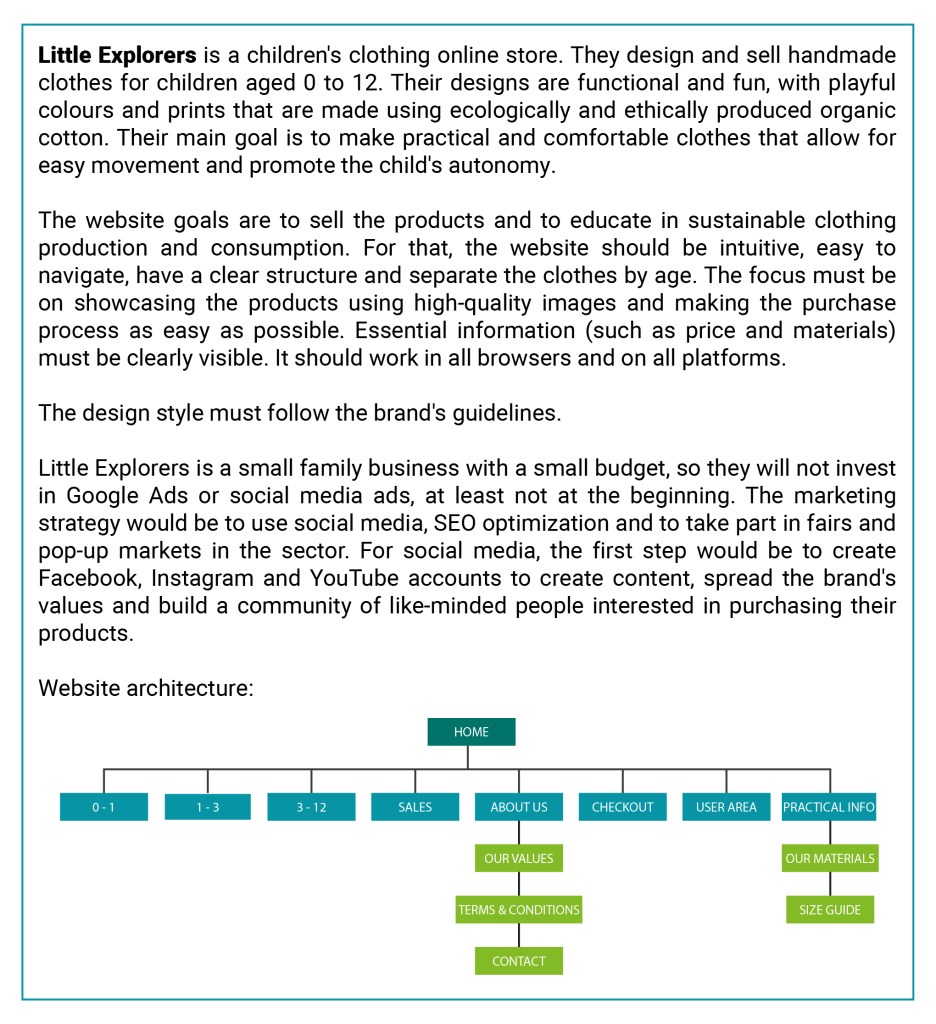
WEBSITE ARCHITECTURE
WEBDESIGN STRATEGY
Domain and hosting The domain name suggested to my client is the business’ name, which is relevant, memorable and usable. For the suffix, we chose .com since it is available. We also decided to purchase .es, the specific suffix in Spain, and redirect it to http://www.floresmarta.com. For hosting, I recommended BlueHost, as it is currently ranked as one of the best services for small businesses, ideal for WooCommerce and very popular for WordPress sites.
Design The website design will be clean and fresh, intuitive and user-friendly with a focus on visual content. It will display correctly in all browsers and be responsive on mobile. A picture carousel in the website header will show the florists’ most relevant work. The web will only be updated occasionally on special dates. The business’ Instagram feed will be displayed on the site to show pictures of the latest orders and work.
Target Audience My client wants to target local women between 25 and 55 who enjoy shopping in their town and support local businesses.
Programming The web will be built in WordPress, as it is easier for my client to manage the occasional updates they might need. Some features can be customised with additional CSS and modifying the PHP files. Once they are ready to add online orders, it will be easy to add WooCommerce to the web to create the shop.
This is the first Lesson Task (previously called Learning Activity) of the second year of Graphic Design (GRA2).
In this case, I was to create a detail brief for a client’s website. This brief should contain all the information that will be needed to achieve the client’s requirements. It should be good enough to hand over to any design/programming team and get a great result.
The brief should cover the following sections:
What is the client’s service/product?
What are their requirements?
What is the website’s goal?
How are you going to achieve this goal?
Build the website architecture (so we can see what sections will be needed)
What is the design style that will be required?
What are your suggestions for marketing the site?
I chose the same client as for my Semester Project last year. See the link here.
This week we have continued learning about web design. The task was to take the basic website I designed in previous Learning Activities (Put Thought Into Your Design and Planning the Structure) and convert that into HTML and CSS code.
I have learned a lot during the week while coding the website. There are quite a few things I would like to fix/improve, but I did what I could with the time I had (and the skills at the time!).
EDIT: I used Atom to code the web as well as Chrome’s Inspect tool.
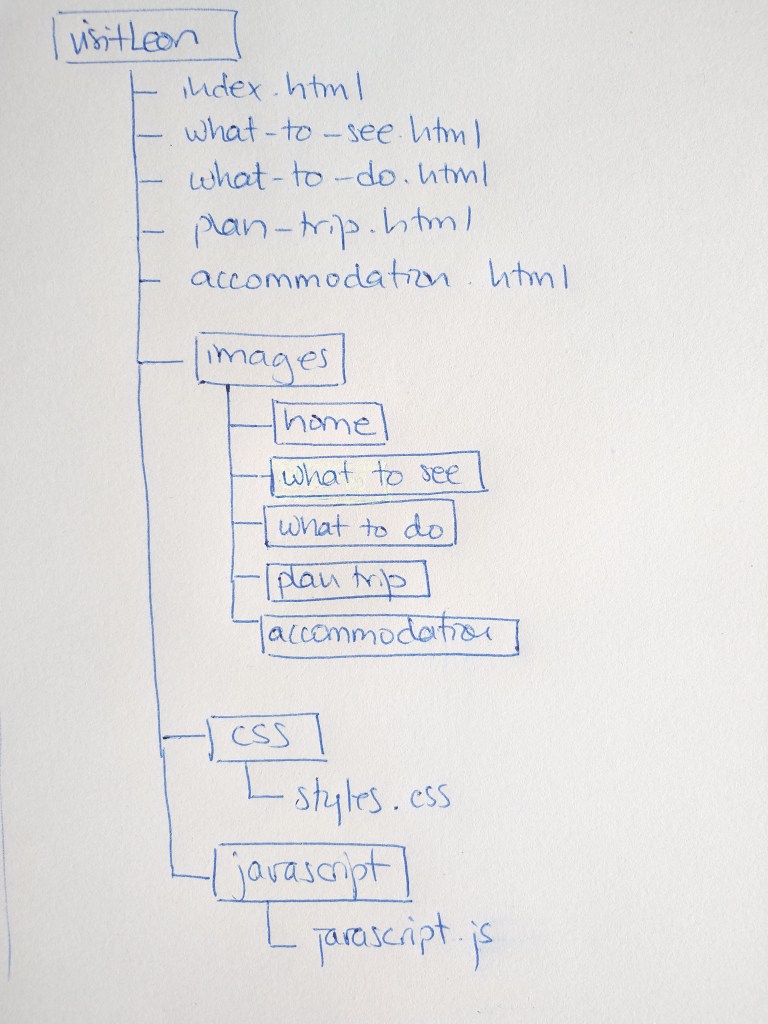
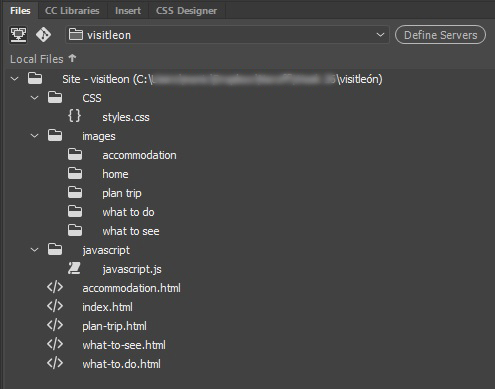
This week I had to create the structure of my web page I designed on week 22 –Put Thought Into Your Design– in terms of HTML files and folders. First I used a pen and paper to do my planning and then do it on the computer.
Below is the structure I planed for my web.
Inside the images folder there is one folder for each webpage
For this learning activity I had to design a 5-page website or blog to promote my hometown (or any other place of my choosing). I should present my design along with a strategy that explains the decisions I’ve made during the design process.
I decided to make the website to promote the town of León, located in the northwest of Spain. Strategic design helps you combine beautiful design with functionality to create a website that meets the client’s and the end user’s goals. In the following lines, I explain the strategy I followed when designing this web.
Establish goals The goal of this website is to promote the city of León to attract both foreign and domestic visitors.
Define the audience The audience is adults who want a getaway to a historical town, different from the obvious -and well-known- Spanish beach destination.
Determine the brand’s image A town full of history, culture and tradition, located on the French Way of the Camino de Santiago where the visitor can also enjoy its fantastic food and (free!) tapas.
Solve the problem The web provides practical information to the traveller, divided into 5 pages with links to further details about places, activities, accommodation and more.
Measure the results It is not possible to measure the results at this point, as this is a mockup website. If it were to be uploaded, I could use a tool such as Google Analytics to do so.
Look for little improvements Again, once the web is uploaded, I could study the results from a monitoring system and make the adjustments needed to improve it.
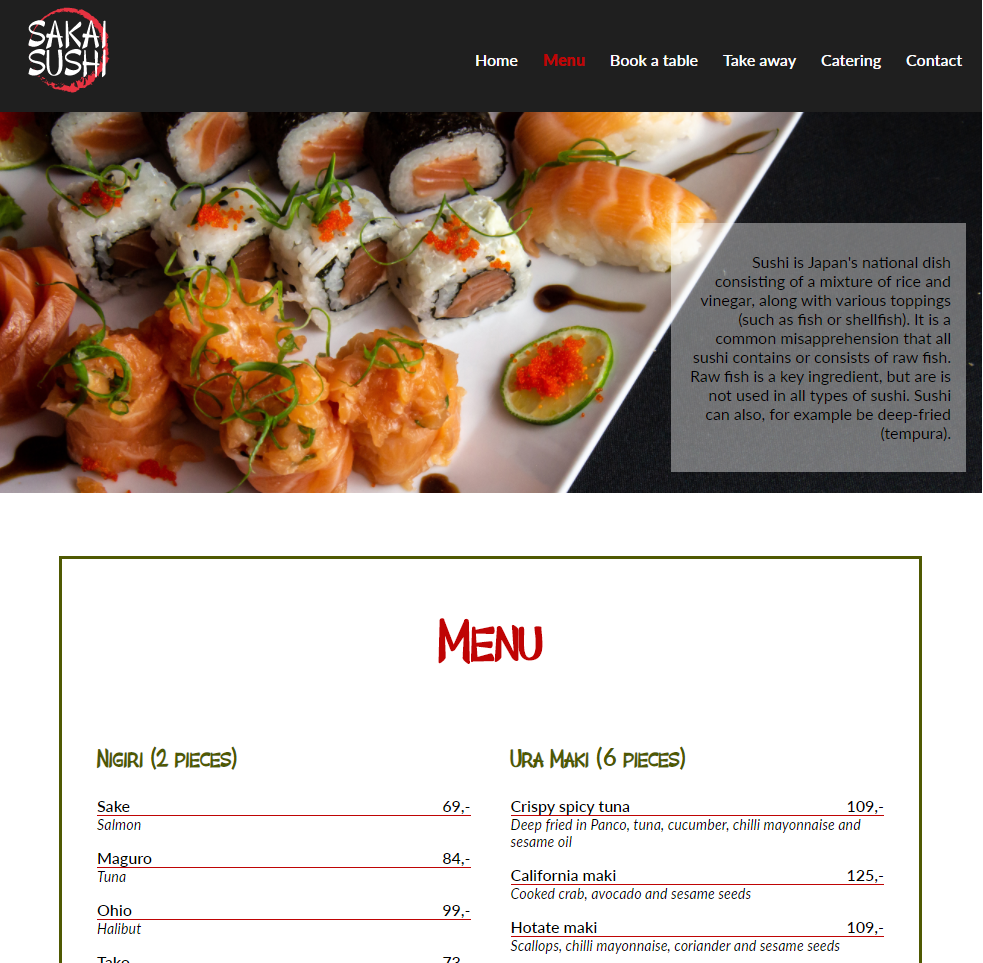
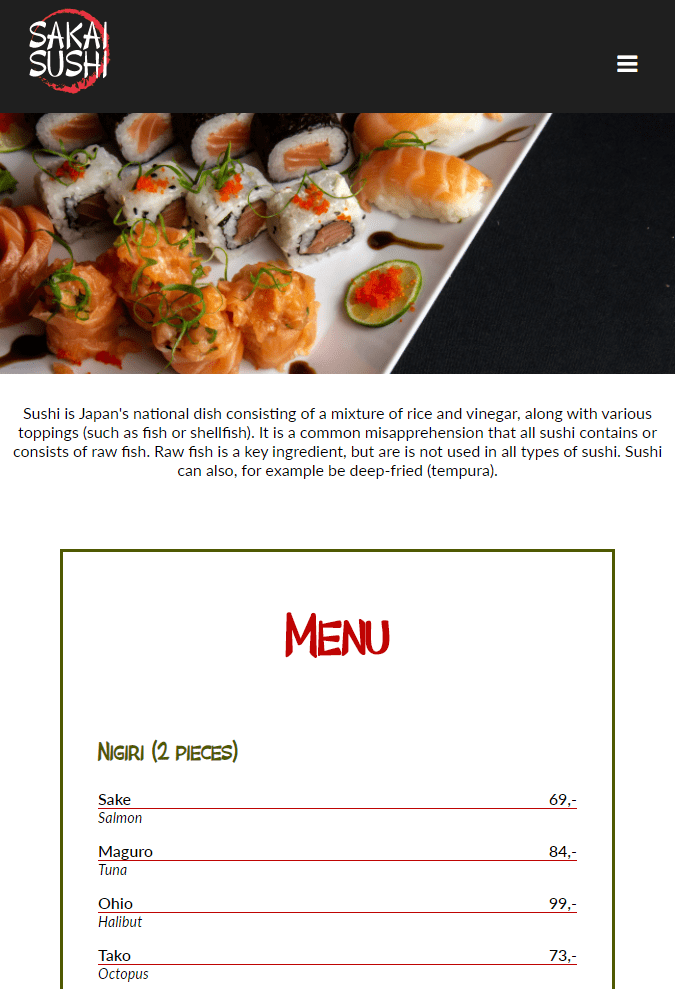
Sakai Sushi is a sushi restaurant that already has a website their customers frequently use. The customers use the site to find contact information, book a table and see what is being served. Sakai Sushi is considering investing more in catering and takeaways. Because of this, they want to design an online menu to add to their website.
The purpose of this mandatory assignment is to design the menu, presented as a web page, coded using HTML and CSS. It should function on various screen platforms, from desktop to mobile; the look should be well designed and appealing.
I used Adobe Dreamweaver to create the web page and Adobe Illustrator for the logo. Here is a link to the live web.




 Mónica's Design Journey


